OpenCV API has been a choice for Image Processing over MATLAB for quite a while now especially on an SoC like Raspberry Pi 3.
However I always had an inquisitive concern (too fancy?) whenever I ran an OpenCV project (as in my previous project for Real-Time Face Recognition System ) that when it seemed that the CPU is doing the best it can, the CPU usage graph never went above 25%.
Since Raspberry Pi has a Quad-Cored BCM 2837 , this meant that the program is using a single core for all the tasks. The fact that my applications are unable to exploit the resources that are available posed a problem to be solved; OpenMP to the rescue.
OpenMP API
Why OpenMP :
Because it is simple and since Raspberry Pi has no significant GPU (for High Performance Computing) which puts OpenCL out of question and no Nvidia tag anywhere puts CUDA out of the picture too. OpenCL can be implemented on a CPU too but the lead time and the overhead will be too much for now.
OpenMP API is designed for multi-processor/core, shared memory machines and has a compiler directive based usage which though simpler to implement does require careful considerations. A thoughtless "#Parallel For" loop can significantly back fire and cause things to break.
A number of tutorials and documentations for OpenMP API are available.Two of those: here and here!
Building OpenCV with OpenMP requires a simple addition at the building process:
I also used my tried and tested method of building extra modules that has never failed me since its discovery.
The building process starts and completes as it should with the following OpenMP tag somewhere in the entire log:
Parallel framework: OpenMP
The OpenMP and OpenCV seem like a good pair to work with on Raspberry Pi.
Will post an update to my inquisitive concern after I get the OpenMP implementation done.
Lot of directives to add.
Project Phase A Face Recognition system to be used for marking attendance in an organisation for a streamlined and centralized record of Employees or Members.
Phase includes the following stages:
A C++ program to detect and store faces. (Detection)
A Python Script to maintain and link available faces. (Linking)
A C++ program to fetch faces from a camera and compare them with available database. (Recognition)
A Python Script to update the record on Google Spreadsheets over a secure wireless connection. (Uploading)
All of this runs on a Raspberry Pi 3.
Phase is and has been my most ambitious project because of the way it works. And also because it is composed of three of my most relished domains: Embedded Linux, Machine Learning and Internet of Things.
Each Functional component took considerable time worth mentioning in this catalog however I also do acknowledge that a lot of hows and whys will still be skipped because they are really large in number.
Last but most important, Kudos to Stack Overflow and every developer that asked relevant questions for this project of mine to be completed even after so many dead ends I have encountered.
Project Phase:
My initial setup was Ubuntu 15.10 on an Intel core i5 laptop. Linux was a choice because I already planned to deploy the final project on a Raspberry Pi. This maintained familiarity with the development platform.
The entire project is too long to discuss every working bit in a single blog post so an extended summary is what this post is. What Phase Does: It Sees You, Remembers You, Recognizes You and Keeps a note of it on Google Drive !
Pretty Cool when you think about it.
Each task stated above uses a separate program linked together to work seamlessly.
It Sees You:
The Video is captured via the integrated webcam (when developing on ubuntu) and via a USB webcam (when run on Raspbian OS [Raspberry Pi]).This is made easy by always fetching the video from the default connected device.As Pi doesn't come with an inbuilt camera,default device is the USB webcam.Voila!
A C++ program linked with the OpenCV (build from source:make,make install) running a cascade Haar's Frontal Face classifier detects the faces in an image.The task of detection is the following two things:
Number of faces in the image
Segmenting ,Cropping and Resizing Faces
Detecting One Face and Saving to Database
Detecting One Face and Saving to Database
A Video Documenting the database creation is as shown:
It Remembers You:
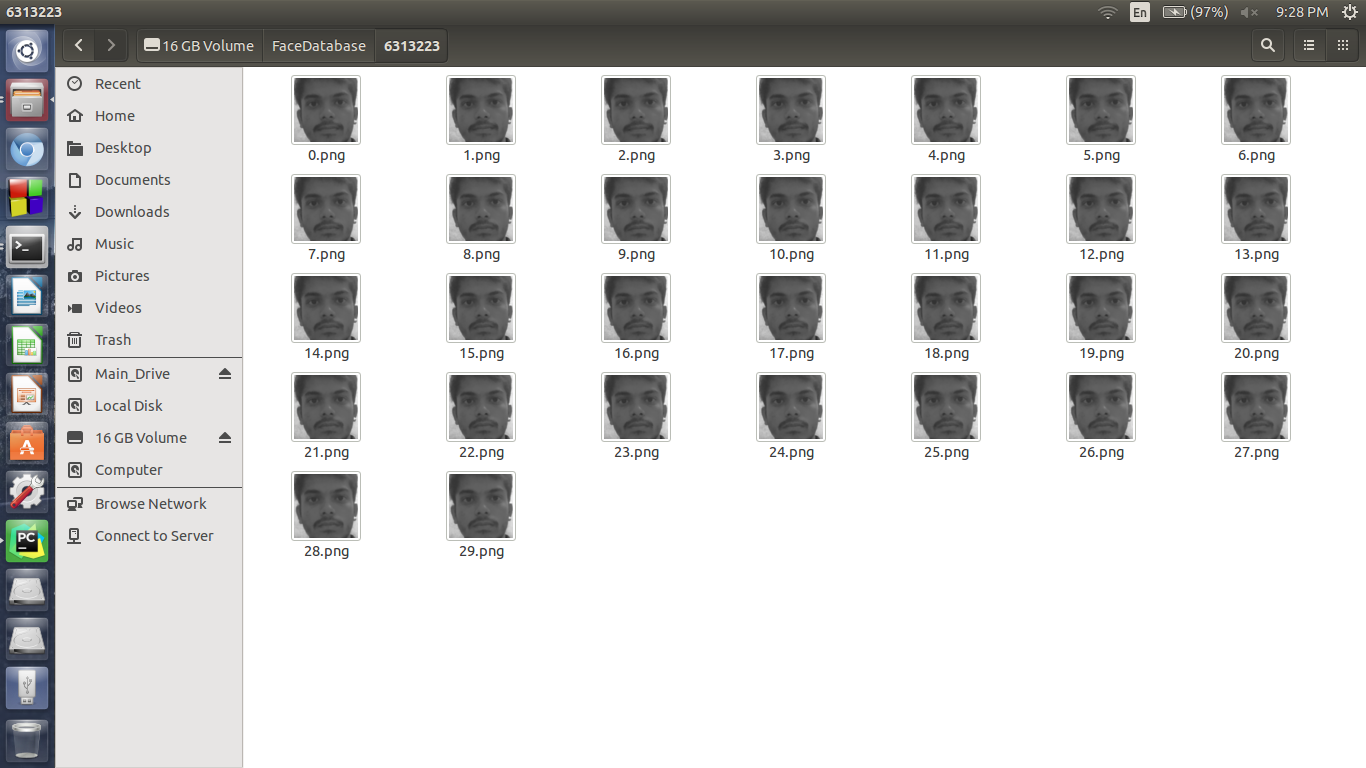
The database of a face is created only when only a single face is detected by the classifier.This ensures that the database of a single individual contains images only of that individual.Before saving the faces are gray scaled and resized to 300 x 300 pixels.
A lot of guidance was received from OpenCV documentation.This includes the above folder structures to store faces.
Root Folder
Database of an Individual
Although the database of images is created successfully,For a program to actually "See" them,It is crucial that every image is properly documented along with the ID of the person they represent.This path creation and Labeling is done by a Python Script.
The Python script creates a record in .csv format which contains :
Full Path of the image
Label Corresponding to the Image
Since images are stored in a folder named after the id of the person, The name of the folder is infact the Label for our task.
The .csv file created looks like:
The .CSV file created is used by the next segment to fetch,load and train the Face Recognizer algorithm.
It Recognizes You The Task of Face Recognition is done by C++ Program written using OpenCV library.
The Face Recognition module is not native to the official source yet so the additional libraries are built using a new method I came up with as documented here.This method is more reliable than the conventional route.
The program fetches live feed from the default imaging device and processes it frame by frame.
The first task that the program performs is to train its Two classifiers on the training database and labels of images.The Two algorithms used are:
Eigenface is single class specific i.e. It finds the similarities between multiple images of same individual whereas FisherFace finds the differences between different individuals.The Collective and commonly agreed result of both these algorithms trained on the same set of images is used as a confirmation of a prediction.
The Haar's cascade is run to segment the faces which are the evaluated by the two algorithms and predictions are returned by both.The value of prediction is accurate 90% of the trials however it depends on the quality of images in the database.
Video Documenting Face Recognition:
Keeping a note on Google Drive: The task of connecting securely to google cloud is done by a python script. It uses the following package to do the task of accessing and updating attendance on google spreadsheet.
Oauth2client (Google Cloud Authentication Client)
Gspread (Google Spreadsheet API client)
PyOpenSSL (Python Open SSL package)
The Result of prediction (Roll No. or Unique ID) is given to the Cloud Connect Script as a command line argument. The script fetches the date of current day from the system.These two data elements are enough to mark a student as present.
The Logic here is always a tautology,
i.e. if a student 'A' arrives before the system ,he is marked as present for the current day.
if a student 'A' is absent, he never arrives for attendance before the system, hence he is not marked for that day thus stating him absent.
The Python Script connects to a google spreadsheet via valid security credentials and update the attendance onto it.The programming is done in such a way that it handles all the possible scenarios that can arise on the spreadsheet section. Few of the problem -> solution are:
Date Row not found -> Create row for Current Date. (When taking attendance on a new day)
Roll No not found -> Create column for Roll No. (When database is updated)
Date Row found, Roll No column not found -> Add Roll No column and write "Present" in current date row (Database updated during current day)
Date Row not found, Roll No. Column Found -> Add Date Row and write "Present" in current Roll No. column (Database Intact, Day changed )
The Data for the recognized individual is successfully updated in 3-4 seconds. This is slow compared to execution time of our Recognizer program however keeping in mind all the authorizations and Credential check every time, it for sure is a lead over other unsecured connections.
The Google spreadsheet is edited to give write access to our API token so that there is no conflict of permissions during write task.
Here is the video of Phase updating the attendance of a detected individual in real time:
The Pi Setup:
The Setup is done with a Dell VGA monitor using an HDMI to VGA converter to connect to Raspberry Pi. Additionally USB Webcam,Keyboard & Mouse are connected via USB port.The webcam lights are kept off because of high current surge of 6 LEDs. They barely make any improvements in lighting conditions anyway.
An 8GB Sandisk MicroSD card is loaded with NOOBS and Raspbian OS is installed.
OpenCV is built from source using my method for extra modules building as stated here.
CodeBlocks is installed from apt-get and code is copied to from the ubuntu system to Pi using a thumb drive.
Static path for database storage, database linking,fetching and cloud uploading are set to get around using command line arguments every time.The Detection stage still employs CL arguments to denote the person being databased.
The entire system is enclosed in a box as follows :
The LCD and the glowing Leds are part of a temperature monitoring system. It measures the temperature of the box internals to warn or ward off any heat damage. And that is an entirely different story for a later time.
The code for a dlib variant of the face detection and recognition project is available for access on my github here : https://github.com/sanjeev309/face-recognition-dlib-tensorflow-knn
You will need to modify the core code to suit your requirement for an attendance system.
Pull requests are welcome.
-----------------------------------------------------------------------------------------------------------------
Success is not final, failure is not fatal: it is the courage to continue that counts
Used :
Code::Blocks IDE
PyCharm IDE
Raspbian OS
Atmel Studio 7.0
A While ago I mentioned the need for a minimalist and cheap embedded development board .You may read my previous post here: Developing Slimmer AVR board
It was that day when I designed the prototype and today, I present to you :
A minimum AVR development board with what you need to get started.
The Initial Silk-less Give-Away model
Smooth Edges and Simplified design
Dimensions as that of a Credit Card!
Ergonomic and Simplified PCB Layout
The Size equivalent to the size of your credit card and powered by an ATmega32 at its heart .It gives ThinAVR the following capabilities:
In addition to the above features that are provided by ATmega32 alone, ThinAVR also comes with:
A 16X2 LCD connection port mainly for program debugging operations,connected on Port C
Additional Power and Ground Pins for interfacing external circuits
External Crystal Oscillator for reliable UART/USART operations.The Internal clock just doesn't make it for UART
Mounting holes on all 4 corners for a robust design
In-Built ISP Port so that you can always reprogram your board.
Push Button Power Switch because Reliability
On Board Voltage Regulation for protection from over-voltages
Power On Indication LED
Ergonomic Dimensions the size of a credit card
Sleek Look and Slim design
The board is expected to bridge the gap between a development board and a functional embedded system project by making the platform so affordable that each project has its own ThinAVR.
The Initial batch of ThinAVR has been distributed to aspiring embedded developers for a faster growth curve, proper feedback and a higher adoption rate.
ThinAVR v0.9beta :
-No Silk, Markings with a sharpie
-Female connectors for ports,Male Connector for 16x2 LCD
-12MHz Crystal Oscillator
-Embedded ATmega32
-Power Circuit
-Need ISP Programmer to burn programs.
The Next version therefore will have more or less things.
This post is the second in the series of developing a neural net line follower. For the post covering dataset generation, go here
Once data is handy, the next objective in a Neural Net is to plan out its structure.
Neural nets are mostly used for uncertain and non-linear operations as is our task of pattern matching a.k.a Classification.
A neural net has mainly the following layers which map the input to the output
Input Layer
Hidden Layer(s)
Output Layer
The Number of Hidden Layer is a deterministic on the complexity of the task being performed.For example, A deep learning net might contain more hidden layers for a deeper defragmentation of data.However there is a trade off between Depth and Speed of execution, therefore for our case, a single hidden layer would be enough.
The Designed Network looks as depicted here:
8 : 1 mapping through a hidden layer of two nodes (and one bias unit)
Intuition says this will be sufficient for our task as a partition in half can easily tell which side of our sensor strip sees the line.
For activation function in our network, I have used tangent sigmoid function:
Tangent Sigmoid Function
For faster development time, the neural net designer tool in MATLAB is used.For the sake of understanding, an algorithmic view is as shown:
x = 1 X 8; {Input from 8 nodes}
W12 = 2 X 8; {Weight Matrix from Input layer to Hidden Layer}
Z1= x*(W12)T = (1X8 * 8X2)= 1X2; {Mapping from Input layer to Hidden layer}
A1= TanSig(Z1)= 1X2; {Activation of Hidden Layer}
W23 = 1 X 2; {Weight Matrix from Hidden layer to Output Layer}
Z2 =A1*(W23)T = (1X2 * 2X1)=1X1; {Mapping from Hidden layer to Output Layer}
A2=TanSig(Z2); {Activation of Output Node}
Y=A2; {Output}
The specifications are set up in the NNFit tool in MATLAB and data obtained from the previous post is used to train the network using Backpropagation Algorithm. After the training completes, the entire process is stored as a script using the prompt window.
By default the script generated contains a lot of redundant information which can be optimised on examination.
The entire script is reduced to the following:
 function [y1] = NNLF(x1)
 %NNLF neural network simulation function.
 %
 % Generated by Neural Network Toolbox function genFunction, 13-Aug-2016 14:40:30.
 %
 % [y1] = NNLF(x1) takes these arguments:
 %  x = Qx8 matrix, input #1
 % and returns:
 %  y = Qx1 matrix, output #1
 % where Q is the number of samples.
 %#ok<*RPMT0>
 %(c)Sanjeev Tripathi ( AlphaDataOne.blogspot.in )
 % ===== NEURAL NETWORK CONSTANTS =====
 % Layer 1
 b1 = [-8.8516132798193108e-10;2.1615423176361062];
 IW1_1 = [-30.312171052276302 -15.230142543653209 -7.5989117276441904 -3.8426480381828529 3.8426480396510354 7.5989117277872076 15.230142543113857 30.312171051352024;1.1787493338995503 1.1684723902794487 -0.30187584946551604 -1.2505266965306716 -0.85655951742083458 -0.61361689937359887 -0.51938433720151178 0.43601182390986715];
 % Layer 2
 b2 = -3.5519126834821509e-10;
 LW2_1 = [1.0000000099939996 2.6043564908190074e-09];
 % ===== SIMULATION ========
 Q = size(x1,1); % samples
 x1 = x1';
 xp1=2*x1 -1;
 xp1=cast(xp1,'double');
 a1 = tansig_apply(b1 + IW1_1*xp1);
 a2 = repmat(b2,1,Q) + LW2_1*a1;
 y1=a2;
 end
 % Sigmoid Symmetric Transfer Function
 function a = tansig_apply(n,~)
 a = 2 ./ (1 + exp(-2*n)) - 1;
 end
The Neural Net being run uses the pre optimized weights to map the input to the output with an accuracy of 100% (High Variance) as the dataset contained all the possibilities. A demo of our net for different inputs entered manually is as shown:
As stated earlier, -1 informs to move left +1 informs to move right ~0 informs to keep moving forward
The network of nodes can compute with accuracy any width,orientation or order of line with absolute accuracy. It can also detect multiple lines simultaneously as the network has been trained for all the possible inputs that it can encounter.
An Implementation on AVR Atmega32 microcontroller to be covered soon.
Stay Tuned for more.
Neural Networks are convenient when mapping a function which behaves non-linearly. However, for Training and Testing purpose , Data is the most important piece of the puzzle.
The Neural Network Line Follower to be designed uses 8 Line sensing elements where each will return
1 : Line Detected
0 : Line Not Detected
So the possible dataset is the combination of 8 binary units arranged in different pattern leading to a total of
28 = 256 Samples of data.
I wrote the following MATLAB script to create the data for training the Neural Network.
 function [bin,out]=DataGen(m)

 % Function to Generate Training Data set for training neural network of a
 % line follower
 %
 %     [bin,out]=DataGen(number of inputs)
 %
 % It is a good practice to have an even number of input units for the
 % NN Network to be trained
 n=(2^m)-1;
 bin=decimalToBinaryVector(0:n);
 [p,q]=size(bin);
 out=zeros(p,1);
 bLeft=bin(:,1:(q/2));
 bRight=bin(:,((q/2)+1):end);
 wL=bi2de(bLeft,'left-msb');
 wR=bi2de(bRight,'right-msb');
  for i=1:p
    if wL(i)>wR(i)
      out(i)=-1;
    end
    if wL(i)<wR(i)
      out(i)=1;
    end
    if wL(i)==wR(i)
      out(i)=0;
    end
  end
 end
Here: bin holds the binary input sequence of 8 bits out holds the output corresponding to the input bin Such that:
if bin=[1 0 0 0 0 0 0 0] then out = -1 (Line Sensed on far left : Move Left)
if bin=[0 0 0 0 0 0 1 0] then out = 1 (Line sensed on right : Move Right)
if bin=[0 0 1 0 0 1 0 0] then out = 0 (Line sensed symetrically : Keep Moving Forward) For a Neural Network, 0 is pretty much a perfection so it allocates a really small value (~0) such that it can be considered as zero.
From the script above with 8 as a parameter via the following syntax:
[bin,out]=DataGen(8);
we get:
bin = 256 X 8 Input Data Matrix
out = 256 X 1 Output Data Matrix
In the screenshot of the varibles, Left Segment shows the input from the sensors while we have the expected output in the blue bounded box on right:
These Data elements are ready to be used as Training Parameters for our Neural Network.
Further Development to be covered by subsequent posts.