We have always sought of new ways to interact with computers. From typed commands to automatic speech recognition, the aim is to make it appear natural to us, as if not interacting with a computer but a Human.
Project AlphaUI
AlphaUI is a virtual menu interface that lets you interact naturally with the GUI displayed. It works by using a webcam to capture live frames and through Image Processing finds out where the user wants to point out in the given space.
The Program is written in C++ using OpenCV 3.1.0 Library and performs the following operations on each image from which relevant information is extracted.
For the project to be demonstrated, I have utilised my computer vision project: Automatic Face Recognition System. The AlphaUI interface is built on top of the Face Recognition System with a custom GUI giving integrity to both projects.The functional response of interface have been disabled for the demo. Any developer can define their own GUI for their system that require user interaction in the same way.
Screenshots of the system:
The AlphaUI interface
Ball tracked continuously by the system
Touchless Interaction with the interface
The system can be trained on any object of interest provided it is distinct in color (read HSV segmentation) . The training is done by repeatedly marking all over the object with the mouse pointer. This step has to be done only once in a lifetime or when you need to use a new marker. The values are saved in a text file to be reused in next run.
Disclaimer:
This project was done about an year ago but never saw daylight until now. What would you do with the possibilities of this project? Do comment and let me know.
The Good side of OpenMP is its inherent simplicity. The ease with which it enables you to write parallel code is remarkable.
This post is an update to a previous post: Building OpenCV with OpenMP. In this post, it's all about performance analysis of OpenCV with and without OpenMP.
The code being used is the popular N-body Simulation used to simulate gravitational effect on large particle systems. I have used source code as available on Mark Harris'sgithub repo with a few modifications.
Modifications made are as follows:
A 2-D Coordinate system in place of a 3-D system for visualisation in OpenCV
Integer precision for co-ordinate calculation for visualisation.
Integer time step dt which determines the speed of our simulation .
Drawing circles with radius = 0, giving us particles the size of a unit pixel.
Dynamic Window size declaration and adaptation
Re-Wrote random coordinate generation method for 2-D coordinate system.
Approach #1: Total Execution Time
The Total Execution time for computing N iterations for the particle system is directly indicative of performance for N-body Sim. In general terms, if N iterations take time T on a single core , then N iterations should theoretically take time T/4 on a Quad-core CPU. Though this might not always be the case, it is a good parameter to evaluate.
Approach #2: CPU Resource Monitor
All OSes are bundled with a resource monitor that maps CPU utilisation with time.The resource monitor is an effective tool to visually examine the CPU per core usage.
A combination of approach #1 and #2 is used to examine OpenCV with and without OpenMP parallelization.
Have a look at what my code for N-body simulation for N= 2500 particles looks like:
The following benchmark has been evaluated for 1000 iterations of 2500 particles.
EVALUATION:
Without OpenMP Parallelization
Time:
time is a command in the Unix operating systems. It is used to determine the duration of execution of a particular command.
  time ./nbody
  real        2m7.258s
  user        1m37.096s
  sys         0m0.500s
CPU Core Usage:
The calculations being done on a single core with occasional core switching
The CPU usage graph shows that at any given time, Only a single core is being used for the calculation. Additionally, the core being used is also switched by the OS occasionally.
With OpenMP Parallelization
Time:
   time ./nbody
   real        1m23.373s
   user        3m31.596s
   sys        0m0.696s
CPU Core Usage:
The CPU usage during OpenMP being used is sufficient to show that the code is run parallel on multiple cores. The CPU time shows the same as we have a reduced real time (as in wall time) by running computations on 4 cores of the CPU. For details of how to interpret the time output, refer this answer on Stack Overflow.
OpenMP is therefore an easy to use framework in cases where code needs to be distributed on multiple cores. Since its inception, it has advanced sufficiently and have been adopted among developers looking to leverage improved hardware capabilities.
OpenCV API has been a choice for Image Processing over MATLAB for quite a while now especially on an SoC like Raspberry Pi 3.
However I always had an inquisitive concern (too fancy?) whenever I ran an OpenCV project (as in my previous project for Real-Time Face Recognition System ) that when it seemed that the CPU is doing the best it can, the CPU usage graph never went above 25%.
Since Raspberry Pi has a Quad-Cored BCM 2837 , this meant that the program is using a single core for all the tasks. The fact that my applications are unable to exploit the resources that are available posed a problem to be solved; OpenMP to the rescue.
OpenMP API
Why OpenMP :
Because it is simple and since Raspberry Pi has no significant GPU (for High Performance Computing) which puts OpenCL out of question and no Nvidia tag anywhere puts CUDA out of the picture too. OpenCL can be implemented on a CPU too but the lead time and the overhead will be too much for now.
OpenMP API is designed for multi-processor/core, shared memory machines and has a compiler directive based usage which though simpler to implement does require careful considerations. A thoughtless "#Parallel For" loop can significantly back fire and cause things to break.
A number of tutorials and documentations for OpenMP API are available.Two of those: here and here!
Building OpenCV with OpenMP requires a simple addition at the building process:
I also used my tried and tested method of building extra modules that has never failed me since its discovery.
The building process starts and completes as it should with the following OpenMP tag somewhere in the entire log:
Parallel framework: OpenMP
The OpenMP and OpenCV seem like a good pair to work with on Raspberry Pi.
Will post an update to my inquisitive concern after I get the OpenMP implementation done.
Lot of directives to add.
Project Phase A Face Recognition system to be used for marking attendance in an organisation for a streamlined and centralized record of Employees or Members.
Phase includes the following stages:
A C++ program to detect and store faces. (Detection)
A Python Script to maintain and link available faces. (Linking)
A C++ program to fetch faces from a camera and compare them with available database. (Recognition)
A Python Script to update the record on Google Spreadsheets over a secure wireless connection. (Uploading)
All of this runs on a Raspberry Pi 3.
Phase is and has been my most ambitious project because of the way it works. And also because it is composed of three of my most relished domains: Embedded Linux, Machine Learning and Internet of Things.
Each Functional component took considerable time worth mentioning in this catalog however I also do acknowledge that a lot of hows and whys will still be skipped because they are really large in number.
Last but most important, Kudos to Stack Overflow and every developer that asked relevant questions for this project of mine to be completed even after so many dead ends I have encountered.
Project Phase:
My initial setup was Ubuntu 15.10 on an Intel core i5 laptop. Linux was a choice because I already planned to deploy the final project on a Raspberry Pi. This maintained familiarity with the development platform.
The entire project is too long to discuss every working bit in a single blog post so an extended summary is what this post is. What Phase Does: It Sees You, Remembers You, Recognizes You and Keeps a note of it on Google Drive !
Pretty Cool when you think about it.
Each task stated above uses a separate program linked together to work seamlessly.
It Sees You:
The Video is captured via the integrated webcam (when developing on ubuntu) and via a USB webcam (when run on Raspbian OS [Raspberry Pi]).This is made easy by always fetching the video from the default connected device.As Pi doesn't come with an inbuilt camera,default device is the USB webcam.Voila!
A C++ program linked with the OpenCV (build from source:make,make install) running a cascade Haar's Frontal Face classifier detects the faces in an image.The task of detection is the following two things:
Number of faces in the image
Segmenting ,Cropping and Resizing Faces
Detecting One Face and Saving to Database
Detecting One Face and Saving to Database
A Video Documenting the database creation is as shown:
It Remembers You:
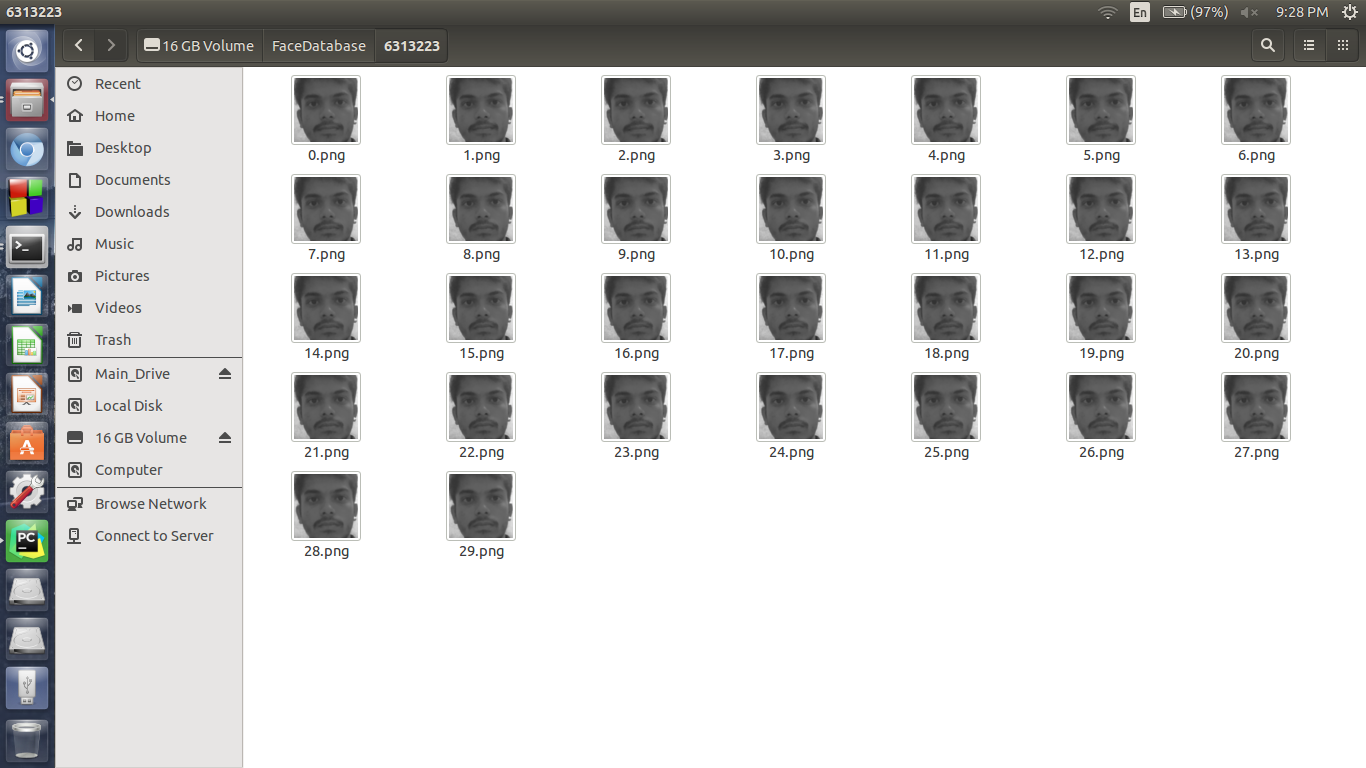
The database of a face is created only when only a single face is detected by the classifier.This ensures that the database of a single individual contains images only of that individual.Before saving the faces are gray scaled and resized to 300 x 300 pixels.
A lot of guidance was received from OpenCV documentation.This includes the above folder structures to store faces.
Root Folder
Database of an Individual
Although the database of images is created successfully,For a program to actually "See" them,It is crucial that every image is properly documented along with the ID of the person they represent.This path creation and Labeling is done by a Python Script.
The Python script creates a record in .csv format which contains :
Full Path of the image
Label Corresponding to the Image
Since images are stored in a folder named after the id of the person, The name of the folder is infact the Label for our task.
The .csv file created looks like:
The .CSV file created is used by the next segment to fetch,load and train the Face Recognizer algorithm.
It Recognizes You The Task of Face Recognition is done by C++ Program written using OpenCV library.
The Face Recognition module is not native to the official source yet so the additional libraries are built using a new method I came up with as documented here.This method is more reliable than the conventional route.
The program fetches live feed from the default imaging device and processes it frame by frame.
The first task that the program performs is to train its Two classifiers on the training database and labels of images.The Two algorithms used are:
Eigenface is single class specific i.e. It finds the similarities between multiple images of same individual whereas FisherFace finds the differences between different individuals.The Collective and commonly agreed result of both these algorithms trained on the same set of images is used as a confirmation of a prediction.
The Haar's cascade is run to segment the faces which are the evaluated by the two algorithms and predictions are returned by both.The value of prediction is accurate 90% of the trials however it depends on the quality of images in the database.
Video Documenting Face Recognition:
Keeping a note on Google Drive: The task of connecting securely to google cloud is done by a python script. It uses the following package to do the task of accessing and updating attendance on google spreadsheet.
Oauth2client (Google Cloud Authentication Client)
Gspread (Google Spreadsheet API client)
PyOpenSSL (Python Open SSL package)
The Result of prediction (Roll No. or Unique ID) is given to the Cloud Connect Script as a command line argument. The script fetches the date of current day from the system.These two data elements are enough to mark a student as present.
The Logic here is always a tautology,
i.e. if a student 'A' arrives before the system ,he is marked as present for the current day.
if a student 'A' is absent, he never arrives for attendance before the system, hence he is not marked for that day thus stating him absent.
The Python Script connects to a google spreadsheet via valid security credentials and update the attendance onto it.The programming is done in such a way that it handles all the possible scenarios that can arise on the spreadsheet section. Few of the problem -> solution are:
Date Row not found -> Create row for Current Date. (When taking attendance on a new day)
Roll No not found -> Create column for Roll No. (When database is updated)
Date Row found, Roll No column not found -> Add Roll No column and write "Present" in current date row (Database updated during current day)
Date Row not found, Roll No. Column Found -> Add Date Row and write "Present" in current Roll No. column (Database Intact, Day changed )
The Data for the recognized individual is successfully updated in 3-4 seconds. This is slow compared to execution time of our Recognizer program however keeping in mind all the authorizations and Credential check every time, it for sure is a lead over other unsecured connections.
The Google spreadsheet is edited to give write access to our API token so that there is no conflict of permissions during write task.
Here is the video of Phase updating the attendance of a detected individual in real time:
The Pi Setup:
The Setup is done with a Dell VGA monitor using an HDMI to VGA converter to connect to Raspberry Pi. Additionally USB Webcam,Keyboard & Mouse are connected via USB port.The webcam lights are kept off because of high current surge of 6 LEDs. They barely make any improvements in lighting conditions anyway.
An 8GB Sandisk MicroSD card is loaded with NOOBS and Raspbian OS is installed.
OpenCV is built from source using my method for extra modules building as stated here.
CodeBlocks is installed from apt-get and code is copied to from the ubuntu system to Pi using a thumb drive.
Static path for database storage, database linking,fetching and cloud uploading are set to get around using command line arguments every time.The Detection stage still employs CL arguments to denote the person being databased.
The entire system is enclosed in a box as follows :
The LCD and the glowing Leds are part of a temperature monitoring system. It measures the temperature of the box internals to warn or ward off any heat damage. And that is an entirely different story for a later time.
The code for a dlib variant of the face detection and recognition project is available for access on my github here : https://github.com/sanjeev309/face-recognition-dlib-tensorflow-knn
You will need to modify the core code to suit your requirement for an attendance system.
Pull requests are welcome.
-----------------------------------------------------------------------------------------------------------------
Success is not final, failure is not fatal: it is the courage to continue that counts
Used :
Code::Blocks IDE
PyCharm IDE
Raspbian OS
Atmel Studio 7.0